



Compare MiFi Deals

Find the best 4G/5G mobile broadband plans on the market

White portable MiFi device with three-dimensional Wi-Fi signal arcs

Best deals of October 2026

compared, last updated

Providers

The company you buy broadband from

Infrastructure

The technology your provider uses

Download Speed (Mbps)

Monthly Cost (£)

Upfront Cost (£)

Contract Length (Months)

Reset filters

5G MiFi

Three
  • Unlimited

    Monthly data

  • 100 Mbps

    max. download speed

  • Mobile WiFi

    Device

  • £24.00*
    per month
  • £0.00 upfront
  • 24 month contract
View Deal

*Monthly cost increases to £26.30 per month in April 2027 and £28.60 per month in April 2028.

4G MiFi

Three
  • Unlimited

    Monthly data

  • 100 Mbps

    max. download speed

  • Mobile WiFi

    Device

  • £20.00*
    per month
  • £0.00 upfront
  • 24 month contract
View Deal

*Monthly cost increases to £22.30 per month in April 2027 and £24.60 per month in April 2028.

4G MiFi 100 Mbps

Vodafone
  • Unlimited

    Monthly data

  • 100 Mbps

    max. download speed

  • 4G Mobile Hotspot

    Device

  • £16.00*
    per month
  • £0.00 upfront
  • 24 month contract
View Deal

*Monthly cost increases to £18.50 per month in April 2027 and £21.00 per month in April 2028.

4G WiFi 5GB Essentials

EE
  • 5 GB

    Monthly data

  • 100 Mbps

    max. download speed

  • 4G WiFi

    Device

  • £19.00
    per month
  • £40.00 upfront
  • 1 month contract
View Deal

4G MiFi Uncapped

Vodafone
  • Unlimited

    Monthly data

  • Uncapped

    max. download speed

  • 4G Mobile Hotspot

    Device

  • £20.00*
    per month
  • £0.00 upfront
  • 24 month contract
View Deal

*Monthly cost increases to £22.50 per month in April 2027 and £25.00 per month in April 2028.

5G WiFi 5GB Essentials

EE
  • 5 GB

    Monthly data

  • 100 Mbps

    max. download speed

  • 5G WiFi

    Device

  • £21.00*
    per month
  • £100.00 upfront
  • 24 month contract
View Deal

*£22.50 from 31 March 2027; £24 from 31 March 2028

4G WiFi 25GB Essentials

EE
  • 25 GB

    Monthly data

  • 100 Mbps

    max. download speed

  • 4G WiFi

    Device

  • £22.00
    per month
  • £40.00 upfront
  • 1 month contract
View Deal

5G WiFi 25GB Essentials

EE
  • 25 GB

    Monthly data

  • 100 Mbps

    max. download speed

  • 5G WiFi

    Device

  • £24.00*
    per month
  • £100.00 upfront
  • 24 month contract
View Deal

*£25.50 from 31 March 2027; £27 from 31 March 2028

5G WiFi 5GB Essentials

EE
  • 5 GB

    Monthly data

  • 100 Mbps

    max. download speed

  • 5G WiFi

    Device

  • £26.00
    per month
  • £275.00 upfront
  • 1 month contract
View Deal

5G WiFi 25GB Essentials

EE
  • 25 GB

    Monthly data

  • 100 Mbps

    max. download speed

  • 5G WiFi

    Device

  • £29.00
    per month
  • £275.00 upfront
  • 1 month contract
View Deal

About these results

  • CompareBroadband.com is a price comparison website. We display broadband deals from broadband providers across the UK, and allow you to compare tariffs based on factors such as their pricing, speeds, technology type, and more. To purchase a broadband plan, click "View Deal" and complete the transaction on the provider's website.
  • Displayed prices assume that payment is made via direct debit. Some providers may charge higher costs when payment is made using other methods.
  • Some broadband providers have mid-contract price rises, meaning the monthly cost on a given tariff can increase at certain intervals during the contract period by a specific predetermined amount. When a mid-contract price rise is in place, this is shown on our website at the bottom of each deal card.
  • In the filters shown next to the comparison results, a "Provider" is a company that you buy broadband from. Each Provider uses one or more types of "Infrastructure", which is an underlying broadband network used to deliver internet service. For example, BT and Plusnet both use the Openreach network. Using our website, it is possible to filter tariffs based on Provider or the underlying Infrastructure that they are using.
  • The default "Popular" sort method sorts deals based on the lowest monthly cost, but with certain popular and/or sponsored deals interspersed in the rankings based on manual placement at our editorial team's discretion. These popular deals are prioritised based on our subjective assessment of their market popularity, and their price/value competitiveness compared to other deals on the market. Other sort methods are available using the drop-down menu at the top of the provider filters, including "Lowest monthly cost", "Lowest upfront cost", and "Highest download speed".
  • By default, deals are displayed with a minimum download speed of 100 Mbps. To view all deals, use the "Download Speed (Mbps)" filter next to the deals displayed. Speeds displayed are an advertised average and can vary slightly over time.
  • In some cases, prices and deals displayed are available only to those who are new customers to a given broadband provider. They cannot be taken up by existing customers re-contracting or changing their plan.
  • CompareBroadband.com has commercial relationships with broadband providers displayed on this website. When you click through to a given provider and become a paying customer of them, we may be entitled to receive a commission.
  • At times, broadband providers sponsor certain deals to display higher in the "Popular" sort ranking on our website. When a deal is sponsored, it is labelled as "Sponsored" on the deal card. Choosing a sort method other than "Popular" resets deal rankings so that sponsored listings do not receive priority placement.
  • We make every effort to ensure that prices, contract conditions, and other terms displayed on our website are always up-to-date, but we do not guarantee that all data is always completely correct. Make sure to check the full terms of a given broadband deal on the provider's website before buying.
  • Our website does not necessarily contain all broadband deals from all given providers on the market at any given moment.

How to change broadband provider

  1. 1. Compare broadband deals

    Use CompareBroadband.com to find the best broadband deals available at your address

  2. 2. Place a broadband order

    Find the right broadband plan for you, and place an order on the provider's website

  3. 3. Your new provider sorts your switch

    In most cases, your new ISP will handle everything under Ofcom's One-Touch Switching scheme, including cancelling your old connection

  4. 4. Get set up

    Your new ISP will arrange a quick engineer visit to install fibre to the home, or you'll receive a router in the mail for easy self-setup

  5. 5. Go live with better broadband

    Begin using your better broadband, with upgraded WiFi tech, faster download speeds, or lower monthly costs

FAQs

  • What is CompareBroadband.com?
    • CompareBroadband.com is a comparison website that collates data on broadband deals from major providers across the UK, allowing you to find the best plan for your needs, available at your address.
  • How do you rank broadband deals?
    • By default, broadband deals are sorted by popularity, based on deals with the lowest cost, and plans that people are often clicking on or buying. Sponsored deals can also appear higher in the rankings - these plans are labelled as "Sponsored". You can also choose to rank deals based on the lowest monthly cost, lowest upfront cost, or fastest download speed using the "Sort by" option next to the deals display.
  • How do I switch broadband provider?
    • In general, you can switch broadband provider simply by placing an order for a new broadband plan on a broadband provider's website. Once you place an order, the new provider will handle the cancellation of the old connection on your behalf under Ofcom's one-touch switching scheme. Next, your new provider will organise a time with you to send an engineer to set up your new connection if necessary, or ship you a router in the mail if self-setup is possible. On the switchover date, you'll go live with your new broadband plan, and your old service will cease, helping to prevent any downtime for your broadband connection. There is typically a 14-day cooling-off period after placing a broadband order in case you change your mind.
  • Will I have to pay any fees to leave my current broadband provider?
    • In general, you do not have to pay a fee to leave your current broadband provider as long as you are not in a fixed-term contract with them. Meaning, your initial contract period has expired (which usually occurs 12, 18, or 24 months after buying) and you have not renewed the contract, meaning you have not entered into a new fixed-term agreement with your current broadband provider. If you are in a fixed-term agreement, you usually have to pay a cancellation fee before you can leave.
  • What is the difference between broadband providers and broadband infrastructure?
    • Each broadband provider in the UK sells service delivered using a certain type of infrastructure, also known as a broadband network. For example, BT uses the Openreach network, and Sky uses both the Openreach and CityFibre networks. We allow you to filter broadband deals by provider (seller) and infrastructure (network), in case there is a particular broadband network you would like to use. But if you prefer, you can just filter deals by provider as well.
  • What broadband speed do I need?
    • The exact broadband speed you need depends on how many people use the internet at home, and what sort of activities you do online. For example, streaming high-definition videos requires more bandwidth than regular web browsing does. For one to two people, a 100 Mbps download speed should be plenty, but you might want 200-300 Mbps or more as a family with a lot of people online. To get a more exact idea of what download and upload speed it's worth paying for, given how your household uses the internet, use our internet speed needs calculator.
  • How do mid-contract price rises work?
    • Some broadband providers increase the monthly cost of their plans during the contract period. Usually, the price rise is laid out in pounds and pence when buying a given broadband deal, so you know how the cost will change during the contract period before you commit. If the increase is not laid out ahead of time, and the provider changes their pricing mid-contract, you can generally leave the agreement without paying an early termination fee. Usually, price rises take place annually, often each April, meaning if you buy a 24 month contract, there will generally be two mid-contract price rises to plan around. In saying this though, some broadband providers, often smaller ones, offer tariffs with no mid-contract price increases.
  • Which broadband providers can I use at my address?
    • There are now dozens of different broadband networks and hundreds of different providers serving different parts of the UK. To find out which options are available at your address, type in your postcode at the top of the page, select your address, and browse the different deals available.
  • How can I save as much money as possible when buying?
    • To save money when buying broadband, we recommend avoiding add-ons such as inclusive landline calling minutes, WiFi extenders, and pay-TV services if you don't really need them. Also, avoid paying for more bandwidth than you need, and make sure to use CompareBroadband.com to view the different deals available at your address before committing to a given provider. It can also be worth considering 5G internet services instead of using fibre broadband to save money, and you may also be able to get a cheaper, discounted broadband deal using a social tariff if you are receiving certain types of benefit payments at the moment.
  • What is the difference between FTTC and FTTP broadband?
    • Most modern broadband plans are delivered using fibre-optic cable, which is laid underground from the local broadband exchange. Fibre is either laid just to the cabinet in your street (fibre to the cabinet, also known as FTTC), with copper bridging the gap from the cabinet to your property, or more commonly, fibre is laid all the way to your house (fibre to the premises, also known as FTTP). While FTTC typically offers maximum download speeds of up to 100 Mbps in most cases, FTTP normally offers 1,000 Mbps or even sometimes up to 10,000 Mbps (10 Gbps).
  • What is 4G/5G internet?
    • Rather than using fixed cables in your street, some broadband providers use wireless internet technology to connect to the internet, just like your phone does. These plans still come with a WiFi router that creates a hotspot you can use to get online, but rather than plugging into a wall socket, the router comes with a SIM card, and connects to the mobile network. Wireless internet plans can be cheaper than fibre broadband, but it's important that you have good mobile network signal in your area to ensure you get good speeds when using this technology. This is why many 4G/5G internet plans come with more generous return policies, allowing you to test the speeds at your house before committing to the length of the contract.

How does MiFi work?

Mobile Wi-Fi (MiFi) devices are small gadgets that create a portable WiFi hotspot to help you get online.
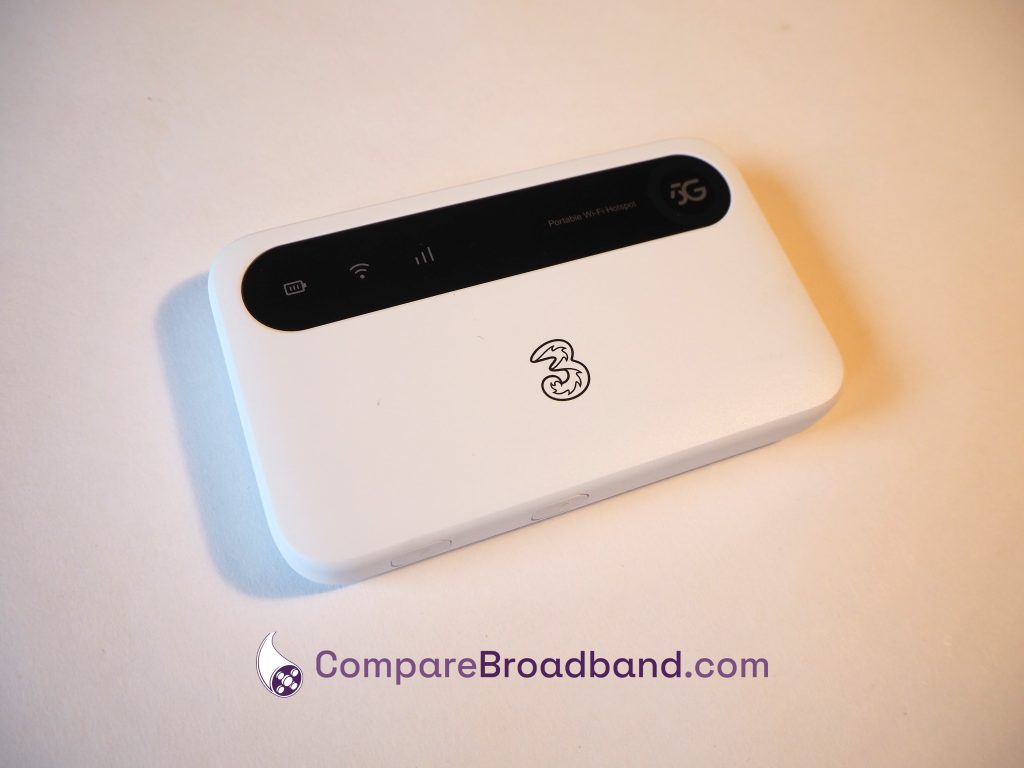
Three 5G MiFi device.

To establish an internet connection, MiFi devices take a SIM card, just like your phone, and connect to the 4G or 5G network.

They are battery-powered, meaning they don’t need a mains electricity connection, and can easily be used when travelling around the UK – unlike a regular broadband router.

When you buy a MiFi plan, you’ll receive a package in the mail with the device itself, a charging cable, and a data SIM plan you can use to get online.

What speeds will I get with mobile broadband?

The speeds on offer with MiFi devices can be quite variable.

In 4G areas, and with a 4G device, you can typically get a download speed of around 20-50 Mbps.

On the other hand, in 5G areas, with a 5G device, you might be able to get 100-150 Mbps or more.

Just note that some 5G MiFi plans are speed-limited, so you can’t always get the full speeds on offer from 5G in your area.

MiFi devices vs dongles

Dongles have historically been the main way to get online using mobile broadband, and they’re still sold today. However, they’re a bit different from MiFi devices.

While MiFi devices have a battery and create a WiFi network, dongles plug into your computer’s USB port, and allow you to get online on just that device.
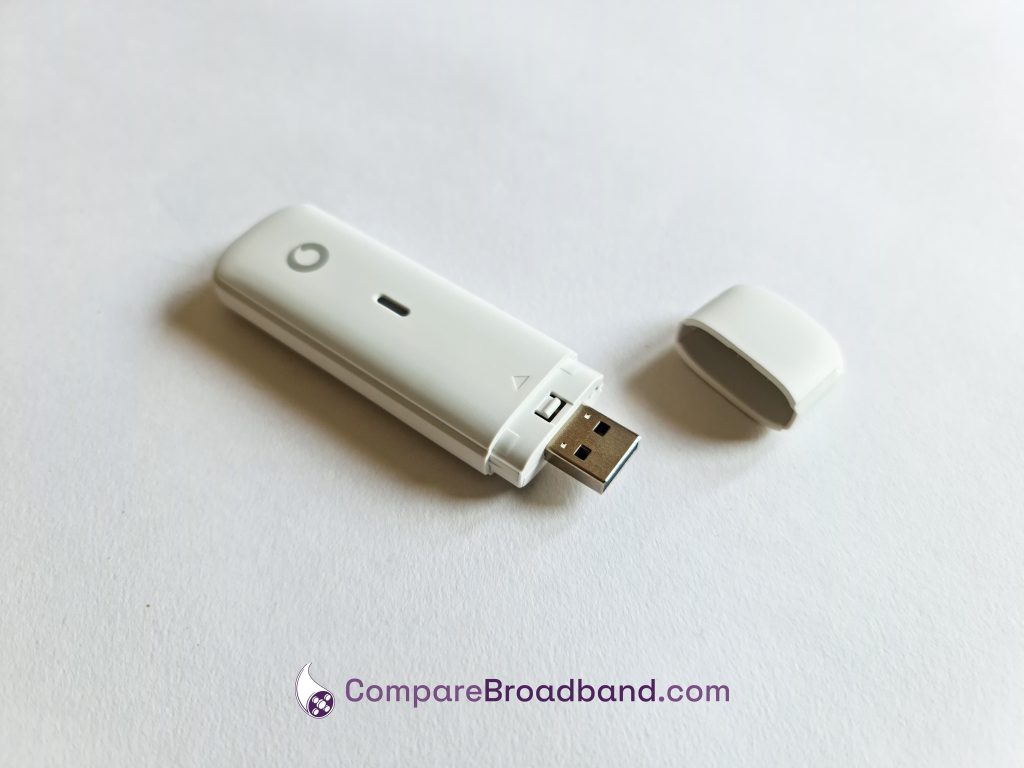
Vodafone dongle device.

Both types of tech take a SIM card and use the 4G or 5G network to get you online, but MiFi is better if you want to get online on more than one device at once, or on phones and iPads – not just computers.

Can I use mobile broadband as a replacement for fibre?

You can use mobile WiFi as your main way of getting online at home.

However, there are some pros and cons to doing this it’s important to keep in mind.

MiFi can be a very convenient, flexible way to get online, often with no long-term contract needed.

It can also be a lot cheaper than using fibre broadband in many parts of the UK.

The main issue is, your WiFi signal and speeds won’t be as good as with a proper broadband router. Meaning, MiFi isn’t the best choice if you want to get online on lots of different hardware at the same time – though it can still handle things like TV streaming on one or two devices at once.

If you want to get online without using fibre, you might be better off with a proper 5G internet connection, rather than using MiFi.

Which mobile network should I use?

In terms of UK-wide signal and speeds, EE is typically the best network overall, on both 4G and 5G.

However, their mobile broadband deals are very expensive, and they often have speed caps, so they’re not always the best choice.

Vodafone has similar issues with speed limits, and doesn’t have as good 4G coverage as EE, but can offer good value. They’re also one of the few networks to offer a dongle, if this is the type of device you want to use.

In most cases though, we think that Three is the best mobile network for mobile Wi-Fi.

They’re normally the cheapest provider on the market, and have really fast 5G speeds.

Their ZTE 5G MiFi device is a really good bit of kit, and they also offer good 4G signal and speeds as well.

How much monthly data do I need?

Fortunately, many mobile broadband devices sold these days come with unlimited data.

However, some plans have monthly data usage caps.

If you’re considering one of these cheaper, usage-restricted plans, you might be wondering how much data you really need.

  • If you’ll be using mobile broadband as your main way of getting online at home, having unlimited data is generally a good idea, especially if you often do data-intensive online activities, such as streaming video.
  • If it’s only two or three people online, and you don’t use the internet for more than 2-3 hours per day, you might be able to get away with a 100-200GB monthly data limit.
  • If you only use the MiFi device occasionally, such as when travelling, a 50-100GB data limit should be plenty, or less if it’s only one or two people getting online for a few days a month.
  • If you only use the MiFi device occasionally, and only for web browsing, reading emails, and a bit of social media, a 5-10GB monthly limit should be enough in most cases.

How to set up a MiFi device

Once you receive your WiFi plan, the first thing to do is normally to insert the SIM card into the device.

To find the SIM slot, you’ll generally have to take the back cover off the MiFi hotspot, which is usually held in place with plastic clips, with a corner you can pry up from.
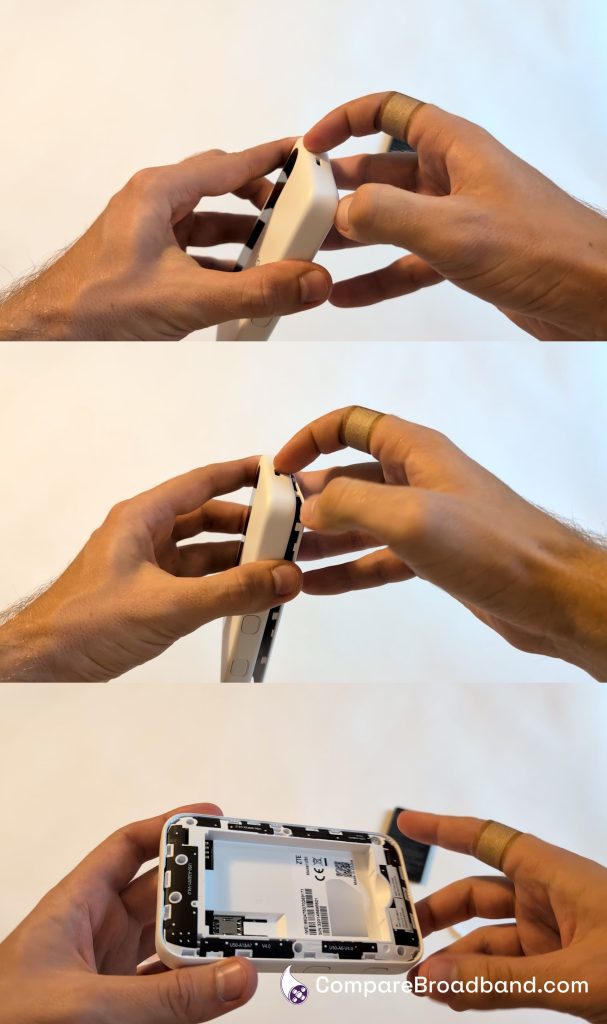
Removing the cover from a MiFi device.

Be careful to punch out the right size of SIM card for the device’s SIM slot, then insert it into position.
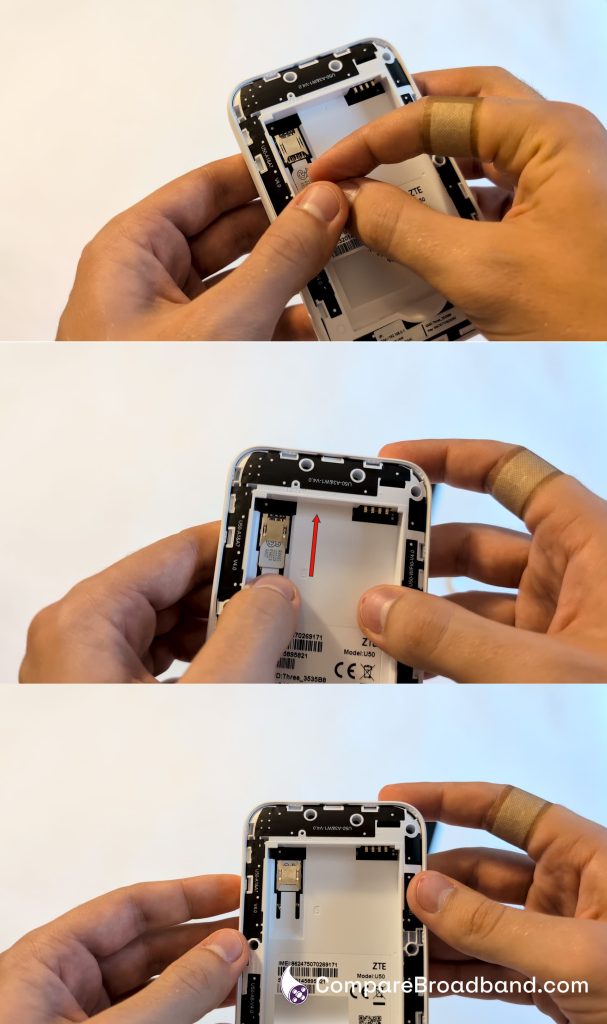
Inserting the SIM card into a MiFi device.

Next, install the battery in the device. It usually has a space you can easily put it in, but make sure it’s the right way around when doing so.

There are usually contacts on the battery and inside the device you can match up, to ensure it’s in the correct position.
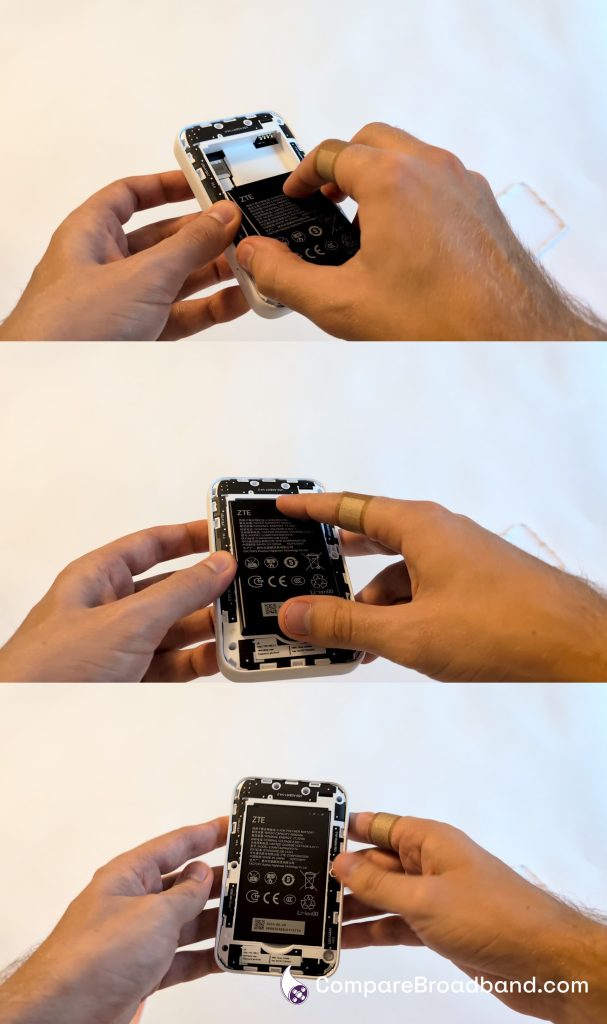
Inserting the battery into the MiFi device.

Then, put the cover back on the device, and hold down the power button for a few seconds. The MiFi hotspot will then turn on, assuming it has charge.

At this point, the device will take a few minutes to connect to the mobile network and create a WiFi hotspot. Then, you can log into the wireless network, and begin getting online.