


Fibrus Broadband overview
| Provider |  |
|---|---|
| Technology types | Fibre to the premises (FTTP) |
| Network used | Fibrus |
| Minimum download speed | 50 Mbps |
| Maximum download speed | 984 Mbps |
| WiFi technology | WiFi 6, WiFi 7 |
| Pay TV | ✅ |
| Landline service | ✅ |
| Static IP available | ✅ |
| Symmetrical speeds available | ✅ |
| Our customer service rating | 9/10 |
| Our router rating | 8/10 |
| Our value for money rating | 8/10 |
Fibrus Broadband explained
Fibrus is a full fibre broadband provider that has its own network infrastructure, rather than piggybacking off Openreach or another provider.
Their service is predominantly available in Northern Ireland, though there are also patches of availability in Cumbria, in the northwest of England.
This provider offers gigabit download speeds, but does not give you the option of getting symmetrical downloads and uploads at the moment.
Our Fibrus review video
Router options
Fibrus is currently shipping Amazon eero WiFi routers to new customers.
These are small, pod-like WiFi routers, which don’t have very many Ethernet ports, but are designed to be easy to link together to create a seamless mesh WiFi network.
On most plans, you get an eero 6+, which comes with WiFi 6.
However, on Fibrus’s fastest tariff, they give you two eero 7 units, which as the name implies, come with WiFi 7.
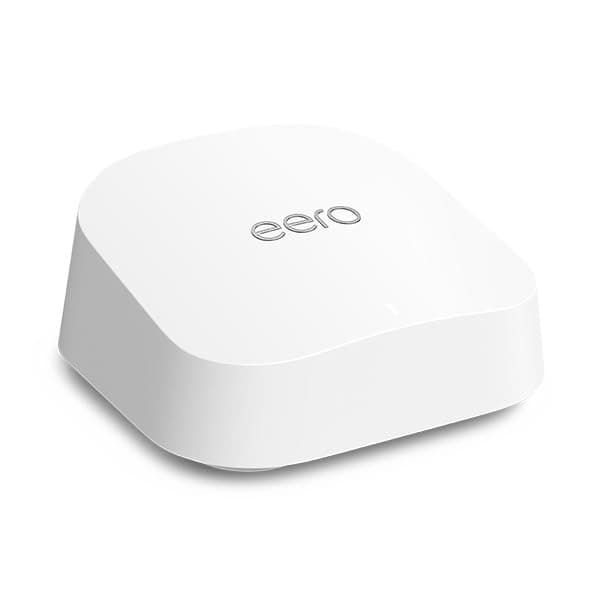
Both of these routers, especially the eero 7, are quite good bits of kit. They have great WiFi signal and range, and come with intuitive mobile apps that make it easier to monitor and control your WiFi network.
As we touched on above, with Fibrus Full Fibre 1,000, you get two of these units, which you can connect together – basically using the second one as a WiFi extender to get better signal throughout the house.
The only real downside to these routers is, they only come with two Ethernet ports each.
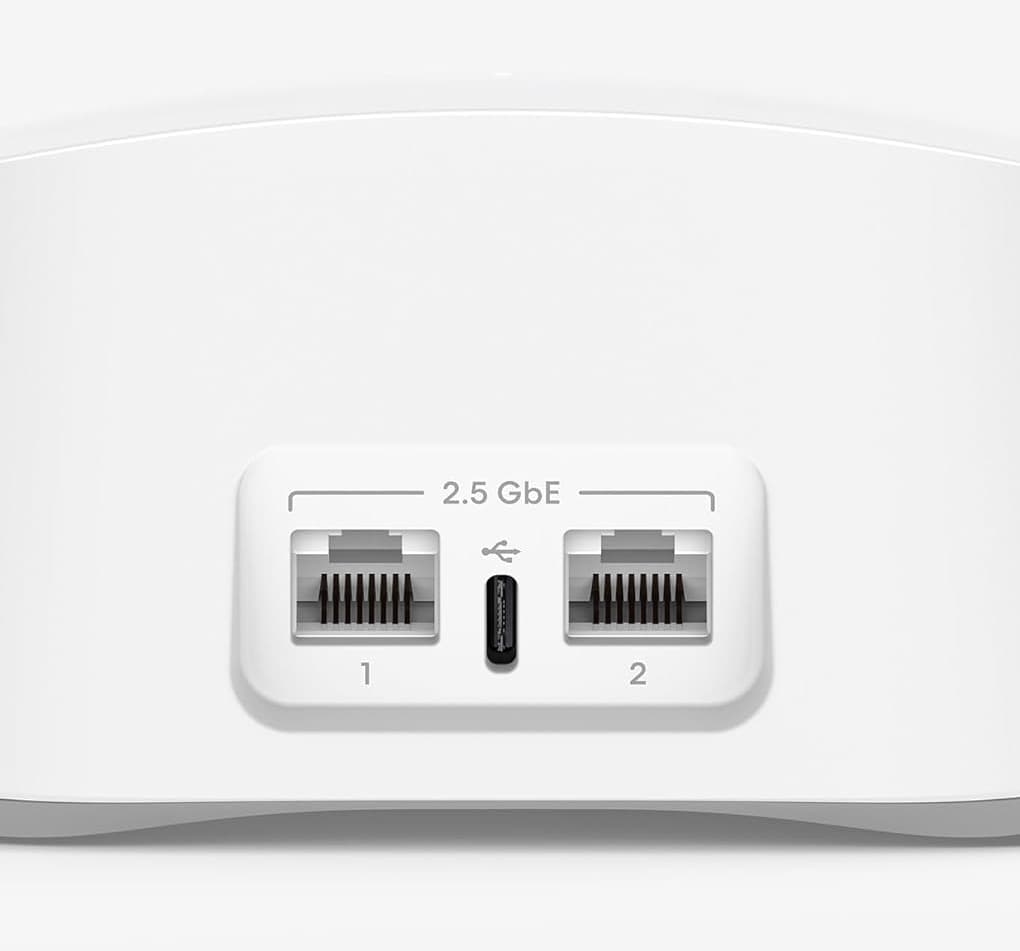
On the main eero unit (the only one, if you’re on Full Fibre 150 or 300), one of these ports will be used to feed broadband in the hub, so you’ll only have one spare LAN port available to use.
However, you can also buy further eero units and pair them together to get better mesh WiFi performance and Ethernet ports, if needed.
Pay TV options
This is quite rare to see from a broadband altnet, but Fibrus does have a TV add-on you can choose to include, which they call Fibrus TV.
When you buy, you get a streaming puck, giving you access to Freeview channels, and a service called Freely, which has other channels available to stream through your broadband connection.
This is not the same experience as buying something like Sky TV – what’s on offer is predominantly free-to-air programmes, on channels such as BBC and ITV.
However, as a more basic option, Fibrus TV is quite reasonably priced compared to getting a full cable TV add-on with a provider like Virgin Media.
And if you want to watch things such as Sky Sports or TNT Sports, you can always get a separate subscription to these channels, then begin streaming them through the relevant app on the Fibrus TV box.
Landline calling options
Fibrus has a landline calling add-on, allowing you to keep your home phone when you switch to them.
For an extra monthly fee, you can port your number over, and continue receiving calls. And with this add-on, called Fibrus Talk, you also get the ability to make inclusive outgoing calls to UK landlines, which is great.
However, you’ll have to pay as you go to call other numbers, including UK mobiles, with this plan. Fibrus doesn’t make it possible to buy a broader inclusive minutes bundle, which is a bit of a downside if you do a lot of landline calling.
Other add-ons
Apart from a landline or pay TV add-on, you can also get a static IP address included when you join Fibrus, which is quite good to see, because not all providers offer this.
Essentially, a static IP address means that your externally-facing IP does not change on a regular basis.
This is useful for people who do things like host game servers on their home broadband connection, or have devices set up that rely on your external IP address remaining the same over time.
Customer service
Fibrus Broadband has very good customer service – this is one of the main reasons you might like to consider joining them over the likes of BT or Sky Broadband.
As a relatively small company, Fibrus is able to take closer care of each individual customer, which has resulted in much higher customer satisfaction ratings than you see with many of the major providers.
They have an NI-based support team, with some members in the broader UK as well, and they’re very helpful when you reach out for support.
When getting set up, Fibrus’s engineers are also quite knowledgeable and helpful, and will guide you through the whole process, including setting up the router for you, if you’d like.
Value for money
We think that Fibrus Broadband is great value for money – the best on the market in many parts of NI and Cumbria, most of the time.
Fibrus typically has quite low monthly costs, and doesn’t usually charge upfront fees. They sometimes have just 18 month contracts as well, meaning you don’t need to lock in for as long as you do when joining most other major ISPs.
However, depending on the deals currently being run, Fibrus’s monthly costs can be quite similar to the likes of BT or Plusnet, and their speeds are pretty similar as well.
Therefore, we’d just recommend comparing Fibrus’s pricing to other major providers before buying, which you can do on our homepage, to make sure you’re getting a good deal if you’re planning on joining them.
More providers
BT
View deals
Vodafone
View deals
Plusnet
View deals
Sky
View deals
NOW Broadband
View deals
Virgin Media
View deals
Community Fibre
View deals
YouFibre
View deals
Hyperoptic
View deals